
UPI merchant charges were due to start on 15 October 2026. On 13 October, NPCI delayed them until after Diwali. It has not given a new date yet. The delay gives you time to get ready. The charges have not been cancelled.
This post explains the rules in simple words and what you can do now.
What changed with UPI merchant charges
The charge is called MDR (merchant discount rate). It is a small fee that the business pays when a customer pays through UPI. The customer pays nothing extra.
The rules are in the news reports from September and October. In short:
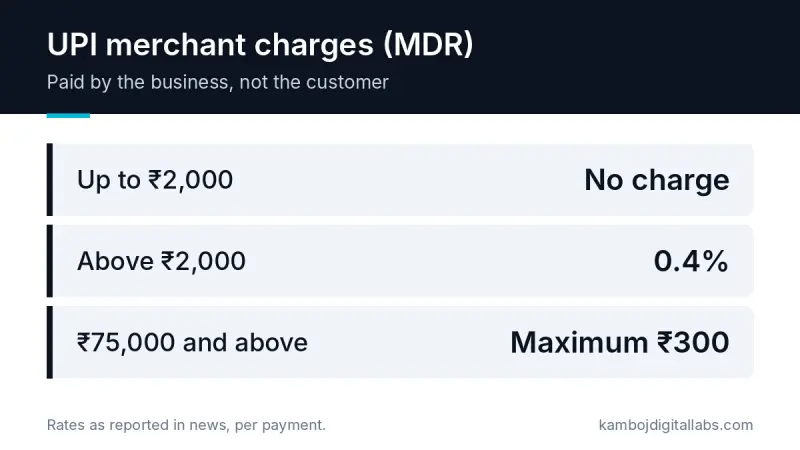
Payments up to ₹2,000 have no charge.
Payments above ₹2,000 can have a charge of 0.4%.
For payments of ₹75,000 and above, the charge is capped at ₹300.
Business owners are not allowed to add this fee to the customer’s bill as an extra surcharge.
The rule is also facing a court case. In late September, the Supreme Court did not stop the charges. It asked the government, RBI and NPCI to reply.
Who pays and what stays free
Most small shops will see little change. Person-to-person transfers are free. Small payments up to ₹2,000 are free. News reports also say small merchants who receive up to ₹1 lakh a month through UPI QR codes are exempt.
The charge matters more if you sell higher-value items online. Think furniture, electronics, machines, courses, or advance payments for services.
A simple example
A customer pays ₹5,000 for an order. At 0.4%, the charge is ₹20. If you get 100 orders like this in a month, that is ₹2,000 in charges. This is only an example. Your payment gateway may charge in its own way.
What to do before UPI merchant charges start
1. Check your order sizes
Look at your last three months of sales. How many payments are above ₹2,000? Those are the ones that can be charged.
2. Ask your payment gateway
If you use Razorpay, PayU, Cashfree or similar, ask them how the charge will appear in your pricing. Ask them in writing.
3. Do not add a surcharge
The rules do not allow you to add this charge to the customer’s bill. If you want to protect your margin, change your product price, not the payment screen.
4. Offer more than one payment option
Keep cards, net banking and wallets on your checkout. Customers can then choose what suits them. Do not make UPI your only option.
5. Keep payment settings easy to change
Do not hard-code payment fees or methods in your website or app. When rules change again, you should be able to update one setting. Also save the payment method on every order, so your reports show what you really pay.
Is your checkout ready for payment rule changes?
We build online stores and custom apps with flexible payment settings and clear sales reports.
Talk to usWhat this means for your website or app
If you sell online, your checkout is the part that feels these changes first. A good checkout can show clear prices, accept many payment methods, and give you a report of fees by payment type. If you are planning an online store or a business app, ask your developer how payment methods and fees are handled. Our services page explains how we build e-commerce and custom software.
Wait for the official start date before you change your prices. Use this time to check your numbers and talk to your gateway.
When will UPI merchant charges start?
NPCI delayed the start until after Diwali 2026. A new date has not been announced yet.
Do customers have to pay the UPI charge?
No. The business pays the charge. Businesses are not allowed to add it to the customer’s bill as a surcharge.
Are small payments charged?
Payments up to ₹2,000 have no charge. Person-to-person transfers are also free.
Will small shops with a QR code pay the charge?
News reports say small merchants receiving up to ₹1 lakh a month through UPI QR codes are exempt.
Does this affect my online store?
It can, if you sell items above ₹2,000 and take UPI payments. Ask your payment gateway how it will apply the charge to you.