
If your website was built with Next.js, there is a Next.js security update you should not ignore. The Next.js team released fixes on 14 October 2026 and again on 3 November 2026. The October fixes cover two critical bugs. A critical bug means an attacker may take control of part of your server without logging in.
You do not need to read code to act on this. You only need to know what to ask your developer, and how fast. This post explains what changed, whether your site is affected, and what to do this week.
What is the Next.js security update?
Next.js is a popular tool that developers use to build websites and web apps. When a serious bug is found in a tool like this, every site built with it may be at risk until the developer updates it.
There are two updates to know about. Both come from the Next.js team.
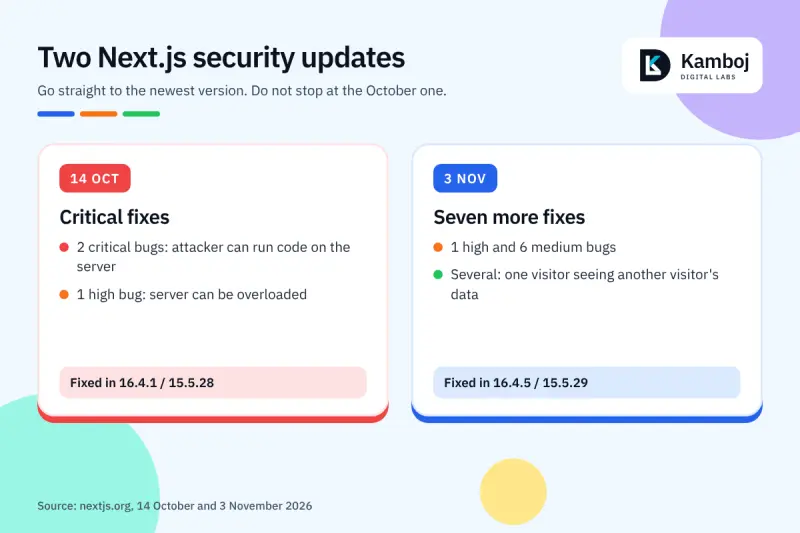
The October update: two critical bugs and one high bug
On 14 October 2026, the team released an out-of-band security update. "Out-of-band" means it was released outside the normal schedule. It fixed three problems:
Critical: a bug that lets an attacker run code on your server without logging in. It affects sites that use a newer Next.js feature called Cache Components, in a specific case. The team says there is no known workaround, so the only fix is to update.
Critical: a second bug that lets an attacker run code on your server. It sits in the image tool that resizes pictures, when it handles SVG files on Linux servers.
High: a bug where crafted requests can make your server very busy, so real visitors cannot use your site. It affects sites that use the App Router with a Server Action. A Server Action is code that runs when someone sends a form.
The fixed versions are 16.4.1 and 15.5.28. Singapore's Cyber Security Agency also published an alert on 20 October 2026. It rates both critical bugs 9.5 out of 10 and says to patch immediately.
The November update: seven more fixes
On 3 November 2026, the team released seven more fixes. One is rated high and six are rated medium. Several of them are about a site showing one visitor's data to another visitor. Others are about cookies being exposed and about image handling. The fixed versions are 16.4.5 and 15.5.29.
If you are still on an older version, go straight to the newest one. Do not stop at the October version.
Is my website affected by the Next.js security update?
Only websites and apps built with Next.js can be affected. A WordPress site, for example, is not built with Next.js, so these bugs do not apply to it.
If your site was built by a developer or an agency, you may not know what it uses. Ask them this one question: "Is our site built with Next.js, and which version are we on?"
Here is how to read the answer:
Not Next.js: nothing to do for this update.
Next.js 16.4.5 or 15.5.29 (or newer): you are up to date.
Anything older: you need to update. Treat it as urgent if the version is older than 16.4.1 or 15.5.28, because the critical bugs are still open.
Some bugs only affect sites that use certain features, such as Cache Components or Server Actions. Your developer can tell you whether your site uses them. Do not decide this yourself. Update anyway. The team says to upgrade immediately even if you think your site is not affected.
What the bugs could mean for your business
Technical names hide the real risk. In simple words:
Someone takes control of your server. They could change your pages, steal data or use your server for other attacks.
Your site goes down. A busy server cannot answer real customers. If you sell online, that is lost orders.
One customer sees another customer's data. Several of the November fixes are about this. For a shop, a booking site or a portal with logins, this is a trust and privacy problem.
A security update is not optional maintenance. Ask for the version number and the date it was updated.
Not sure which version your site uses?
Send us your site address. We will check it and tell you what needs updating.
Check my websiteWhat to do this week
Send your developer or agency this checklist. It works even if you are not technical.
Ask for the current Next.js version of every site and app you own.
Ask them to update to 16.4.5 (if you are on version 16) or 15.5.29 (if you are on version 15), then deploy the update.
Ask if you host on a service such as Netlify. If yes, ask them to check the host's own steps. Netlify, for example, asks users to update its Next.js adapter and clear old cached pages. It also suggests deleting old preview deploys, because they can stay open to attack.
Ask them to test the main pages, forms and checkout after the update.
Ask them to tell you in writing when it is done, and which version is live.
Ask who will watch for the next security release. This is not the last one.
What not to do
Do not wait for the next monthly update. The October bugs are critical, and for one of them there is no workaround.
Do not accept "we are not affected" without a version number. Ask for the version.
Do not update production with no test. A fast update is good. An update that breaks your checkout is not.
Do not forget old sites. Old test sites and preview links are easy to forget, and they can stay open to attack.
How a maintenance plan helps
Security updates arrive every month or two. A site with no one watching it falls behind quickly. If your site was built by us or by someone else, we can check which version you use and tell you what needs fixing. See our website and web app services, or send us your site details.
What is the Next.js security update?
It is a set of fixes from the Next.js team on 14 October and 3 November 2026. The October fixes include two critical bugs that could let an attacker run code on your server.
Which Next.js version is safe now?
The Next.js team released fixes in 16.4.5 and 15.5.29 on 3 November 2026. Ask your developer to move to the newest patch of your version line.
Is my WordPress site affected?
No, not by this update. It only affects sites built with Next.js. Ask your developer if you are not sure what your site uses.
Do I need to update if my site does not use the affected features?
The Next.js team advises upgrading right away, even if your app does not seem to use the affected features. Your developer can confirm which features you use, but the update is the safe step.
How long does the update take?
It depends on how old your version is and how big your site is. Ask your developer for an estimate. A small step between patch versions is usually less work than a jump to a new major version.
Can my hosting company fix this for me?
Some hosts add protection or extra steps, but the real fix is to update Next.js. Ask both your host and your developer.